> For the complete documentation index, see [llms.txt](https://kb.stoque.com.br/llms.txt). Markdown versions of documentation pages are available by appending `.md` to page URLs; this page is available as [Markdown](https://kb.stoque.com.br/abaris/zeev-sead/tarefas-e-fluxos/executando-minhas-tarefas.md).
# Executando Minhas Tarefas
Como descobrir quais são as tarefas em que pode atuar
{% hint style="info" %}
Esta funcionalidade está disponível no módulo principal do **ÁBARIS**, que você acessa através do ***\.abaris.com.br**.*
{% endhint %}
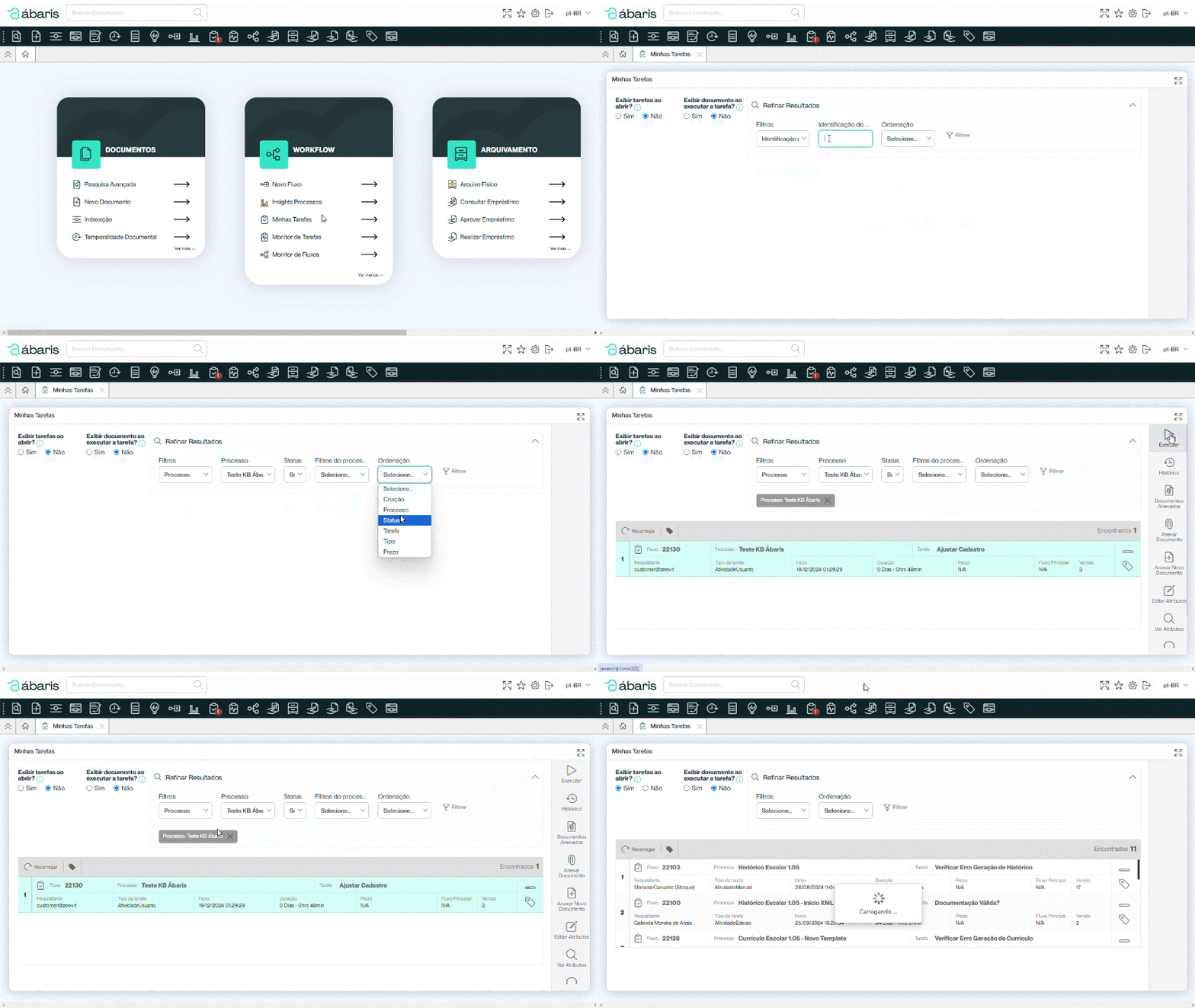
Nesta tela você encontra todas as tarefas que está apto para executar ou que é a pessoa responsável pela tarefa no momento.
Você pode solicitar que a página traga as tarefas ao abrir esta aba, ou pode aguardar para que as tarefas sejam exibidas mediante a utilização dos filtros através da opção "***Exibir tarefas ao abrir?***".
Também pode solicitar que os documentos sejam exibidos em "***Exibir documento ao executar tarefa?***".
Contudo, ao optar por não exibir as tarefas ao abrir, você pode realizar uma busca através do "Refinar resultados", onde consegue realizar um filtro a partir do número da instância (Id do Fluxo) e/ou pelo Processo, podendo também determinar a ordem que esses dados da busca serão apresentados.
Assim como no [Monitor de Tarefas](/abaris/zeev-sead/tarefas-e-fluxos/monitorando-o-andamento-das-tarefas.md), é possível executar as tarefas a partir desta tela e dar andamento no fluxo - porém aqui aparecerão somente as tarefas que estão atribuídas ao seu Usuário ou Grupo de Usuário.
Além de executar a tarefa, é possível
* Visualizar histórico;
* Ver documentos anexados e anexar novos documentos;
* Ver e editar os atributos;
* Abrir os comentários feitos durante o fluxo;
* Visualizar o Diagrama do processo.
{% hint style="success" %}
Note que sempre que houver uma tarefa para o seu usuário, uma exclamação será exibida como notificação na barra superior.
{% endhint %}
---
# Agent Instructions
This documentation is published with GitBook. GitBook is the documentation platform designed so that both humans and AI agents can read, navigate, and reason over technical content effectively. Learn more at gitbook.com.
## Querying This Documentation
If you need additional information that is not directly available in this page, you can query the documentation dynamically by asking a question.
Perform an HTTP GET request on the current page URL with the `ask` query parameter, and the optional `goal` query parameter:
```
GET https://kb.stoque.com.br/abaris/zeev-sead/tarefas-e-fluxos/executando-minhas-tarefas.md?ask=&goal=
```
`ask` is the immediate question: it should be specific, self-contained, and written in natural language.
`goal` is optional and describes the broader end goal you are ultimately trying to accomplish on behalf of the user. GitBook uses it to tailor the answer towards what is most useful for that goal.
The response will contain a direct answer to the question and relevant excerpts and sources from the documentation.
Use this mechanism when the answer is not explicitly present in the current page, you need clarification or additional context, or you want to retrieve related documentation sections.