> For the complete documentation index, see [llms.txt](https://kb.stoque.com.br/llms.txt). Markdown versions of documentation pages are available by appending `.md` to page URLs; this page is available as [Markdown](https://kb.stoque.com.br/abaris/zeev-sead/tarefas-e-fluxos/monitorando-os-fluxos.md).
# Monitorando os Fluxos
{% hint style="info" %}
Esta funcionalidade está disponível no módulo principal do **ÁBARIS**, que você acessa através do ***\.abaris.com.br**.*
{% endhint %}
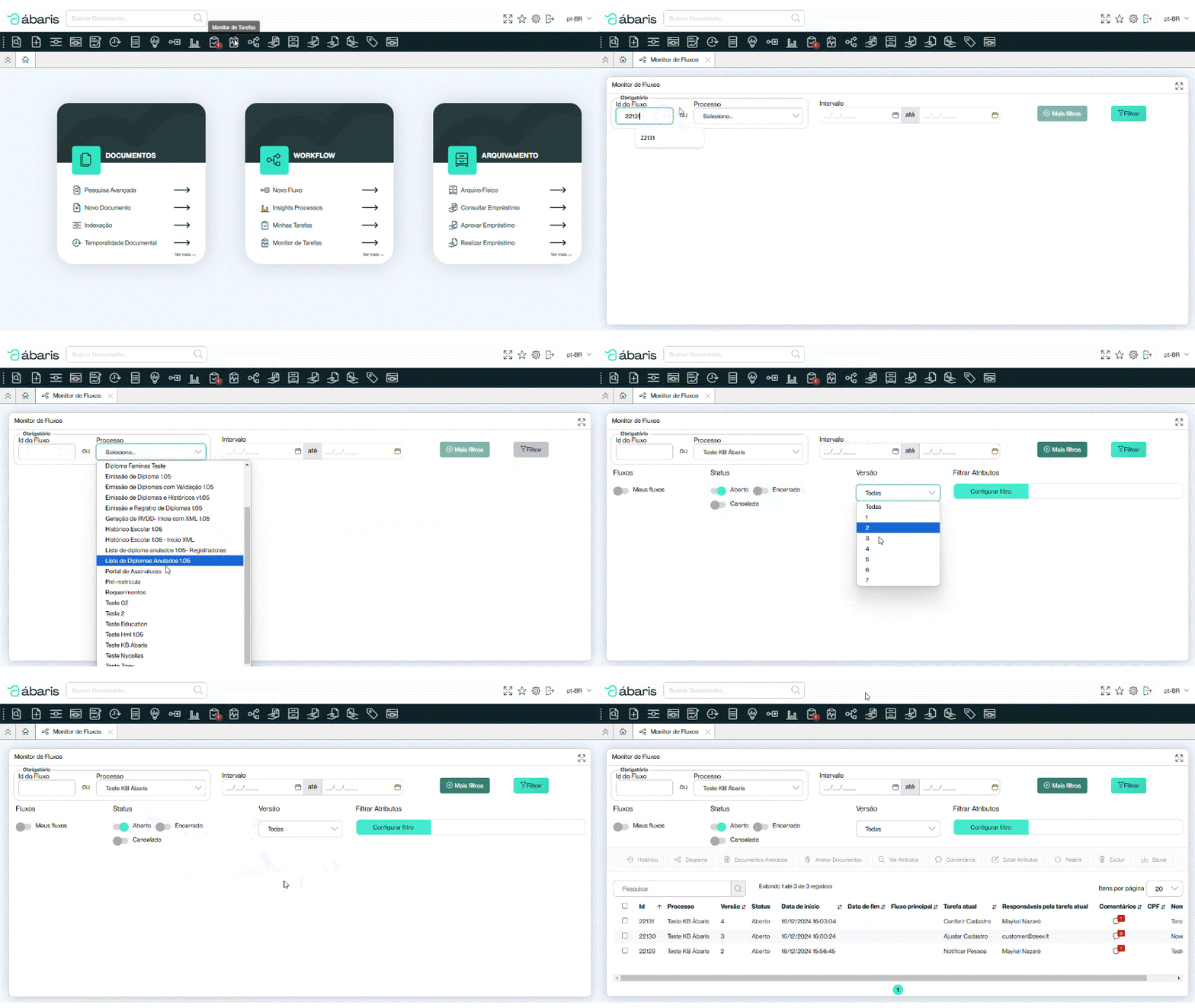
De forma semelhante ao [Monitoramento de Tarefas](/abaris/zeev-sead/tarefas-e-fluxos/monitorando-o-andamento-das-tarefas.md), o Monitor de Fluxos permite que você filtre um fluxo e/ou um processo com todas as suas instâncias.
Se você souber o número da instância (Id do Fluxo) pode verificá-la de forma imediata.
Se preferir, pode realizar a busca por todo um processo/workflow. Neste caso, além de filtrá-lo por data, você consegue filtrar itens mais específicos como seus fluxos, o status do fluxo, sua versão e fazer um filtro por atributos.
Aqui, no Monitor de Fluxos, não é possível dar andamento no fluxo, mas é possível:
* Visualizar histórico;
* Visualizar o Diagrama do processo;
* Ver documentos anexados e anexar novos documentos;
* Ver e editar os atributos;
* Abrir os comentários feitos durante o fluxo;
* Reabrir o fluxo, caso ele tenha sido cancelado (ou em lote, selecionando mais de um item);
* Excluir um fluxo (ou em lote, selecionando mais de um item);
* Baixar os documentos do fluxo (ou em lote, selecionando mais de um item).
---
# Agent Instructions
This documentation is published with GitBook. GitBook is the documentation platform designed so that both humans and AI agents can read, navigate, and reason over technical content effectively. Learn more at gitbook.com.
## Querying This Documentation
If you need additional information that is not directly available in this page, you can query the documentation dynamically by asking a question.
Perform an HTTP GET request on the current page URL with the `ask` query parameter, and the optional `goal` query parameter:
```
GET https://kb.stoque.com.br/abaris/zeev-sead/tarefas-e-fluxos/monitorando-os-fluxos.md?ask=&goal=
```
`ask` is the immediate question: it should be specific, self-contained, and written in natural language.
`goal` is optional and describes the broader end goal you are ultimately trying to accomplish on behalf of the user. GitBook uses it to tailor the answer towards what is most useful for that goal.
The response will contain a direct answer to the question and relevant excerpts and sources from the documentation.
Use this mechanism when the answer is not explicitly present in the current page, you need clarification or additional context, or you want to retrieve related documentation sections.